Essential Data Security and Leakage Prevention Guidelines for Enterprise OpenAI Adoption
 AI-generated image
Key takeaways
To prevent confidential data leaks when adopting OpenAI, it is advantageous to choose Enterprise or API plans where zero data training policies apply. Additionally, safety requires combining a 4-step technical defense—including prompt gateways, DLP masking, and RBAC permission controls—with clear internal security guidelines.
The number of enterprises adopting OpenAI's ChatGPT or APIs to boost productivity is growing rapidly. However, the risk of critical assets—such as source code, customer information, and trade secrets—leaking externally through AI prompt windows has also escalated. According to security industry research, approximately 6.5% of global employees have entered internal corporate data into generative AI services during work, with 3.1% having entered sensitive data like confidential information or source code.
Without combining technical defense lines with institutional guidelines, organizations can easily face unexpected data leak incidents. As of September 2026, let's review the differences in OpenAI data security policies across various plans and walk through a 4-step defense framework that security teams can immediately apply in practice.
What Are the 3 Key Data Leakage Threats Enterprises Face When Adopting OpenAI?
Data leakage threats encountered during generative AI adoption can be summarized into three main categories: careless sensitive data input by employees, model training reuse due to improper plan settings, and external cyberattacks such as prompt injection. Failing to clearly understand the nature of these threats in advance can directly lead to severe asset loss and regulatory violations.
- Unconscious confidential inputs by employees (Shadow AI phenomenon): Examples include developers copying and pasting core source code into ChatGPT while fixing bugs, or planners entering unreleased meeting minutes and customer lists containing personally identifiable information (PII). Under 'Shadow AI' conditions, where employees use AI through unapproved personal accounts, internal control becomes virtually impossible.
- Reuse of input data for AI model training: Using free or Plus personal plans under default settings allows user-entered prompts and attached files to be used for model retraining. This could lead to a disastrous scenario where another company's employee receives your confidential company data in a ChatGPT response.
- Prompt injection and OWASP LLM security threats: In OWASP's Top 10 LLM Security Risks, malicious prompt manipulation (LLM01) and sensitive information disclosure (LLM02) rank among the top threats. There is a risk that external malicious data entering the AI system could open attack vectors to exfiltrate internal network data.
How Do OpenAI Data Security and Training Policies Compare Across Plans?
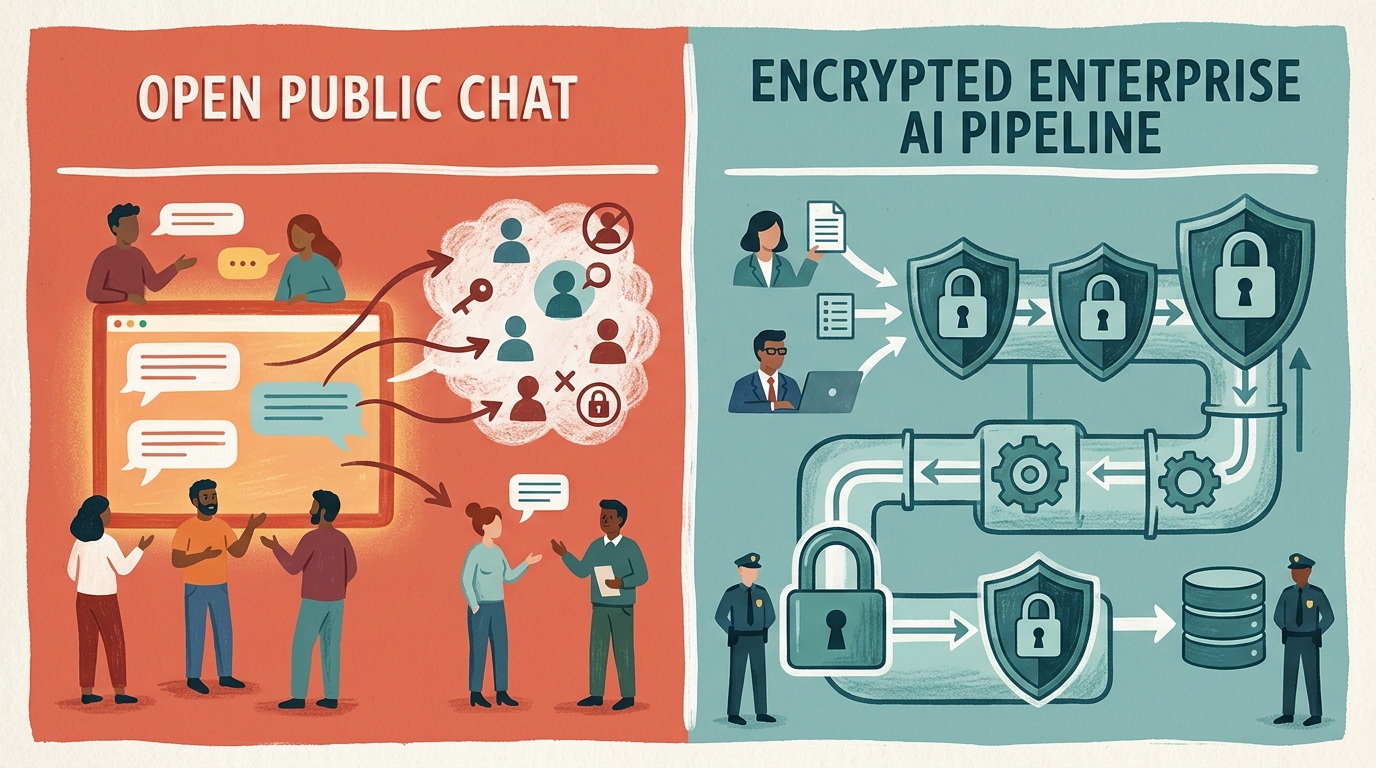
For personal Free/Plus plans, input data is incorporated into model training unless you manually configure the opt-out settings. Conversely, ChatGPT Team, Enterprise plans, and the OpenAI API service do not use input data for model training by default. Thoroughly distinguishing the security standards and encryption levels of each plan is essential to choosing a secure environment tailored to your enterprise needs.
The table below summarizes the data protection policies for key plans as of September 2026.
| Plan Category | Default Data Training | Data Encryption Standard | Key Security & Compliance Certifications | Recommended Target Use |
|---|---|---|---|---|
| ChatGPT Free / Plus | Used for Training (Default Opt-In) | TLS 1.2+, AES-256 | Basic Data Security | Individual Users & Personal Testing |
| ChatGPT Team | Not Used for Training (Default Opt-Out) | TLS 1.2+, AES-256 | SOC 2 Type 2 Support | Small Teams & Departments |
| ChatGPT Enterprise | Not Used for Training (Default Opt-Out) | TLS 1.2+, AES-256 (At Rest) | SOC 2 Type 2, SSO, Domain Verification | Large Enterprises & Security-Sensitive Businesses |
| OpenAI API | Not Used for Training (Default Opt-Out) | TLS 1.2+, AES-256 | SOC 2 Type 2, HIPAA (Upon Request) | Companies Building Custom Internal AI Apps |
According to the OpenAI Official Security and Privacy Guide, data processed via enterprise plans (Enterprise) and the API is encrypted using AES-256 at rest and TLS 1.2+ in transit. Detailed enterprise security architectures can also be reviewed in the DFINITE Enterprise AI Security Report.
 AI-generated image
What Is the 4-Step Technical Defense Framework to Prevent OpenAI Data Leaks?
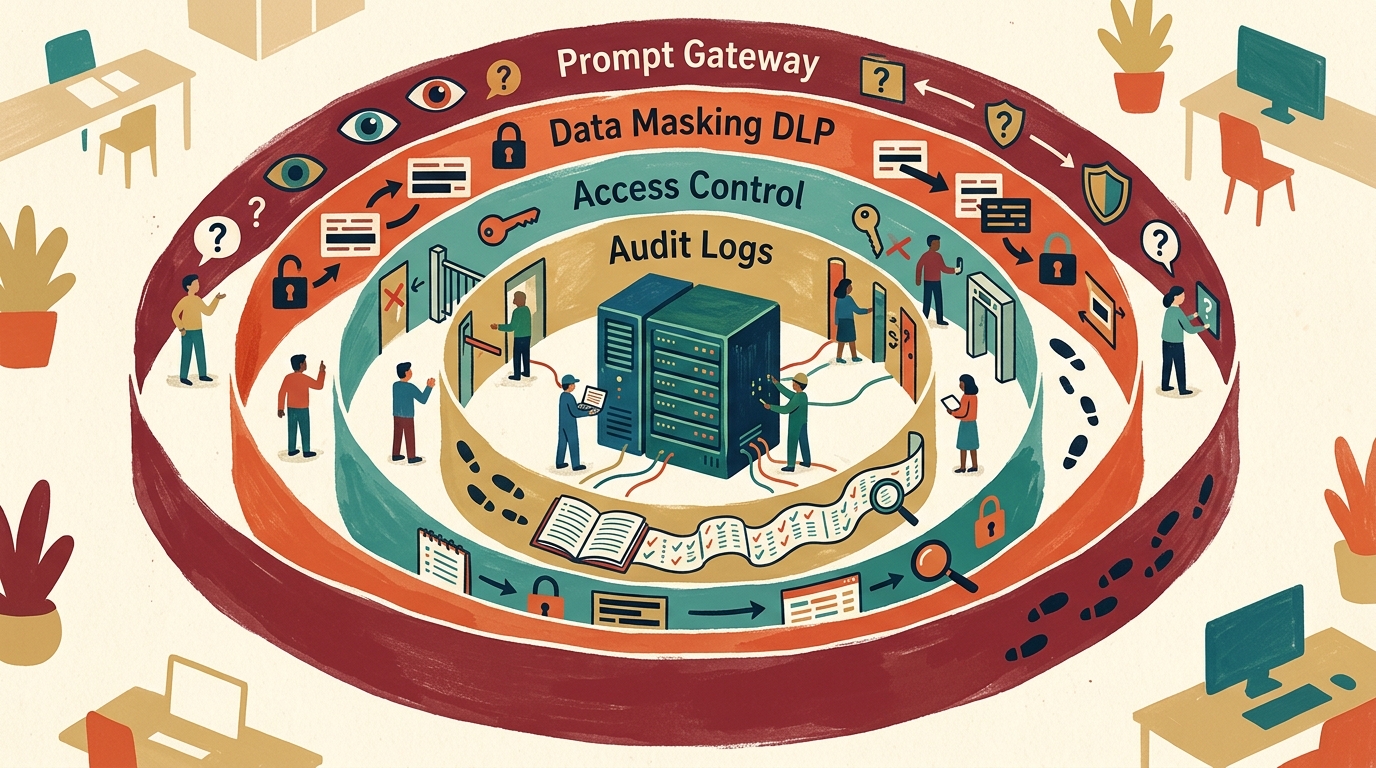
The technical defense matrix is designed across four stages: building an internal prompt gateway, applying real-time data loss prevention (DLP) masking, controlling API access permissions, and managing real-time monitoring and audit logs. Security controls must be enforced throughout the entire pipeline, from prompt input to AI server transmission.
- Step 1: Building an internal prompt gateway and CASB Restrict direct access to external ChatGPT websites using an enterprise proxy or Cloud Access Security Broker (CASB). This blocks unauthorized personal account access while leaving open only enterprise channels verified via Single Sign-On (SSO).
- Step 2: Applying data masking and real-time DLP (Data Loss Prevention) Right before prompts are dispatched to the AI server, system controls automatically detect resident registration numbers, phone numbers, emails, API keys, and specific source code patterns, replacing them with randomized masked strings. This technical approach is outlined in the Comtrue Technology AI Security Analysis Guide.
- Step 3: RBAC-based API key and granular access control Distribute dedicated API keys by department or development team and enforce the principle of least privilege using Role-Based Access Control (RBAC). Setting regular key rotation schedules is essential to mitigate damage from potential key leaks.
- Step 4: Prompt injection defense and SIEM-integrated monitoring Deploy filters that screen out malicious prompt manipulation prior to execution, and integrate all prompt and response logs into the enterprise SIEM (Security Information and Event Management) system. A detailed defense roadmap can be found in the AhnLab Security Center Guide.
What Are the Policy Security Rules for Establishing Generative AI Usage Guidelines?
Establishing effective institutional policy rules requires interlocking three components like clockwork: defining permissible data types, mandating approved enterprise accounts, and delivering regular employee security training. If policies are overly vague or draconian, employees often resort to using AI covertly on personal accounts.
- Classification of permissible data levels: Categorize data into 3~4 sensitivity tiers, such as 'Public', 'Internal Only', and 'Confidential'. Explicitly designate confidential source code, customer PII, and unreleased financial statements as strictly prohibited from AI input.
- Mandating authorized official channels: Instead of merely banning personal ChatGPT usage in corporate policies, consolidate official access through company-procured ChatGPT Enterprise or an internal AI platform.
- Establishing reporting and incident response procedures for security violations: Create direct reporting hotlines and voluntary disclosure procedures so employees do not hide mistakes out of fear of penalties, enabling swift initial containment.
- Regular AI security training for employees: Beyond technical controls, provide quarterly updates on recent data leak cases and safe prompt practices to cultivate self-sustaining security awareness among staff.
 AI-generated image
What Are 4 Common Mistakes Security Teams Make During Enterprise ChatGPT Adoption, and How Can They Be Solved?
Security teams often fall prey to several common misconceptions: believing that purchasing an Enterprise plan alone solves all security needs, outright banning AI access, neglecting internal permission management, or failing to integrate document access controls when building RAG search systems. To prevent these mistakes, the following solutions should be implemented:
- Mistake 1: Blind trust that "Purchasing an Enterprise plan guarantees complete safety"
- Solution: While Enterprise plans prevent OpenAI from retraining models on your data, they do not block internal misuse or external prompt injection attacks. Enterprise DLP solutions and monitoring log integrations must be configured alongside the plan.
- Mistake 2: Blanket-banning generative AI due to fear of threats
- Solution: Unconditional bans drive employees toward 'Shadow AI', using workarounds like personal mobile tethering. Providing a securely controlled internal platform is significantly wiser than outright prohibition.
- Mistake 3: Sharing API keys and neglecting granular access controls
- Solution: Sharing a single API key across multiple departments makes establishing accountability during security incidents nearly impossible. API keys should be segmented by project or department and access permissions regularly reviewed.
- Mistake 4: Failing to integrate Access Control Lists (ACLs) when building Retrieval-Augmented Generation (RAG)
- Solution: When indexing internal policies or documents into a vector database for AI-driven answers, granular authorization systems must be connected to prevent general employees from accessing executive performance reviews or confidential financial records.
Frequently asked questions
Q. Is enterprise data completely safe if we subscribe to ChatGPT Enterprise or Team plans?
These plans offer default policies that exclude input data from model retraining by OpenAI. However, they cannot fully prevent careless confidential inputs by employees or attacks like prompt injection, making it essential to combine them with internal DLP masking and access control systems.
Q. Is input data used for training when building custom internal apps using the OpenAI API?
No. Data processed through the OpenAI API follows a default opt-out policy and is not used for model training. Furthermore, TLS 1.2+ and AES-256 encryption standards are applied during transit and at rest.
Q. How can companies block 'Shadow AI,' where employees use ChatGPT with personal accounts?
It is effective to control personal account access or unapproved AI URLs at the network level using CASBs and security proxies, while providing enterprise-approved accounts or an internal prompt gateway as alternative channels.
Q. What is a prompt injection attack, and how can it be prevented?
A prompt injection attack injects malicious instructions into the AI prompt window to override initial system instructions and exfiltrate internal data. It can be prevented by deploying input/output validation filters and continuously monitoring for anomalies at the gateway level.